

Welcome to Babarpc, your trusted place for the latest PC games and Windows software. Here, we share information about different software and tools in simple and easy language so that users can easily understand what each software does and how it can be useful. In this article, we will discuss BlueScreenView, its overview, features, and important information in simple and plain language.

BlueScreenView 1.55 Portable
BlueScreenView is a small and lightweight Windows utility specially designed for users who occasionally encounter the Blue Screen of Death (BSOD) error. When a serious error occurs in Windows, the system displays a blue screen and restarts. Often users do not understand why this error occurs. This is where BlueScreenView comes in handy.
This software automatically scans the minidump files saved in your system. Whenever a blue screen error occurs, Windows creates a dump file containing the details of the error. BlueScreenView reads these files and displays them in a simple form so that you can see which driver or file is causing the problem.
The main purpose of this tool is to make troubleshooting easy. If your PC is crashing repeatedly, with the help of BlueScreenView you can identify whether the issue is with the hardware or a driver. It can be useful for IT students, computer technicians, and general users alike.
Features of BlueScreenView:
BlueScreenView is quite popular due to its simplicity and useful features. Some important features are listed below:
- Automatic scan of minidump files.
- Shows complete details of BSOD errors.
- Highlights problematic drivers.
- Simple and clean interface.
- Portable version also available (no installation required).
- Displays different crash records in a list.
- Lightweight software that uses less system resources.
- Compatible with multiple versions of Windows.
A nice feature of this tool is that it clearly displays the crash time, error code, and driver name. This speeds up the troubleshooting process.
User Interface and Performance:
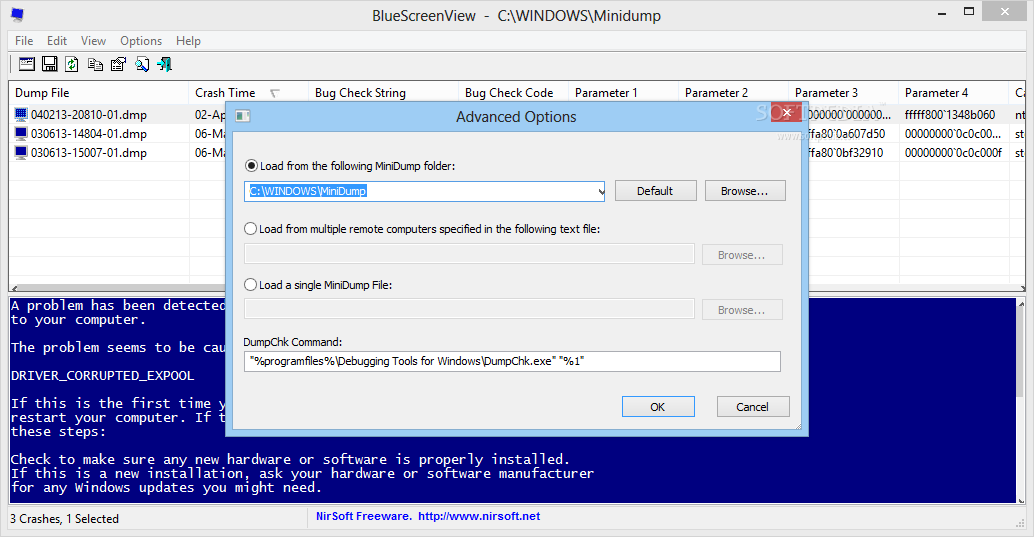
BlueScreenView’s interface is very simple and straightforward. When you open the software, the top window displays a list of crashes, and the bottom window displays details of the selected crash. This way, users can easily identify which file or driver caused the system crash.
This software is very lightweight and doesn’t put much load on the system. Therefore, it doesn’t require high specifications to run. It works smoothly even on older PCs. Since it only reads dump files, it doesn’t run any heavy processes in the background.
Safety and Important Considerations:
BlueScreenView only displays error details; it does not make any changes to the system itself. Therefore, it is generally considered a safe tool. However, always download software from a trusted source to avoid malware or unwanted files.
If you are repeatedly receiving blue screen errors, simply checking the tool may not be enough. You may also need to update drivers, check for Windows updates, or perform a hardware test. BlueScreenView only helps identify the problem; applying a solution is the user’s responsibility.
Conclusion:
BlueScreenView is a simple yet powerful troubleshooting tool that helps diagnose Windows blue screen errors. Its lightweight design, easy interface, and clear error descriptions make it useful for both beginners and advanced users. If your PC is crashing and you want to know the reason, this tool can prove helpful.

Thank you for visiting Babarpc. Here you will find simple and helpful guides about PC software and games.